I just started a computer repair store and a client dropped this off to my warehouse guy. Can you help me out and figure out what memory size and speed this laptop was sold with, along with the model and size of the hard drive?
Challenge Overview
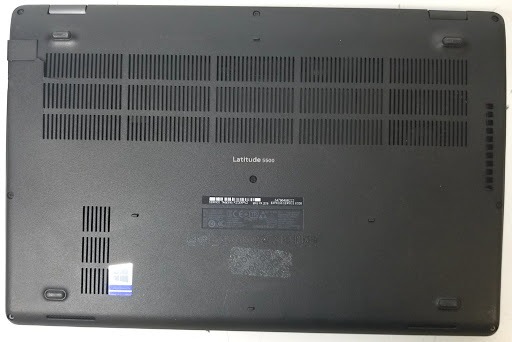
The challenge provided a photograph of a Dell laptop back cover containing several identifiers:
- Model: Dell Latitude 5500
- Service Tag:
FZGXPV2 - Express Service Code:
34795498222
The goal was to figure out the laptop's original factory-shipped configuration:
- RAM capacity
- RAM speed
- SSD capacity
- SSD model
Enumeration
Dell assigns a unique Service Tag to every device, which can be used to retrieve warranty information, hardware specifications, and factory configuration data.
Using the Service Tag FZGXPV2, we can retrieve the system's factory manifest (Bill of Materials) as it left the warehouse. This is crucial because a generic Latitude 5500 specification sheet is insufficient; Dell ships numerous custom hardware combinations under the same model name.
Obtaining the Factory Manifest
A CSV export containing the Dell factory manifest was located. The manifest contained a complete Bill of Materials (BOM) for the system.
1. Memory Component
The memory entry in the manifest was:
MOD,DIMM,16GB,1X16G,2667,N-ECC
With the detailed description:
Dual In-Line Memory Module,16GB,2666,DDR4
- Capacity: 16GB
- Speed: 2666 MHz (Although the system component code references 2667, the description specifies 2666, which is the standard DDR4 speed designation).
2. Storage Component
The relevant storage entry in the manifest was:
Module,Solid State Drive,256G,P32,30S3,BG3
Along with the associated Dell Part Number:
35PK2
This indicates:
- Capacity: 256GB
- Dell SSD Part Number (Model): 35PK2
The Rabbit Hole
Several seemingly correct flags were attempted but rejected:
DawgCTF{16GB_2666MHZ_256GB_BG3}DawgCTF{16GB_2667MHZ_256GB_BG3}DawgCTF{16GB_2666MHZ_256GB_KBG30ZMS256G}
The challenge expected the Dell-specific SSD Part Number identifier rather than the SSD family name (BG3) or the manufacturer model number (KBG30ZMS256G).
Using the Dell Part Number 35PK2 resolves the model parameter.
Resolution
Mapping the extracted component specifications:
16GB2666MHz256GB35PK2Constructing the flag according to the required format:
DawgCTF{RAM_SPEED_DRIVESIZE_DRIVEMODEL}
Takeaways
- Service Tags & Serial Numbers: Manufacturer service tags or serial numbers reveal the exact factory configuration of a system, bypassing the generic model specifications.
- Inspect Every Field: In hardware OSINT challenges, the expected answers often use OEM or vendor-specific part numbers rather than the underlying component's retail model number.